


 USER GUIDE · EN
Trade Control blocks new StereoTrader orders for the currently selected account. The lock applies across all charts and strategies for that account; it does not apply only to the chart currently open. The dialog is titled Trade control and can be opened using the lock icon in the global StereoTrader toolbar.
Close all & lock#
Before confirming, check which account is selected under ACCOUNT. Close all & lock closes all open positions and deletes all Pending Orders for this account, including broker-side orders. This affects the account's entire use in StereoTrader, not only the chart from which you open Trade Control. The lock then blocks new Market and Pending Orders through StereoTrader on every chart and in every strategy for the account. This includes manual order entries in StereoTrader and orders from SEAs.
Warning: This action closes positions and deletes Pending Orders for the selected account. Check the account and its open trades before activating the lock.
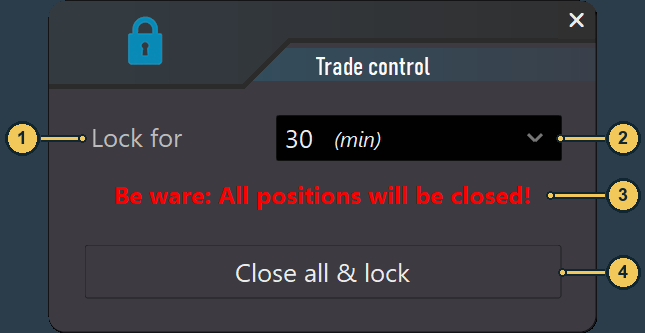
| No. | Label | Description |
|---|---|---|
| 1 | Lock for |
Sets how long the trading lock applies. |
| 2 | Selected duration | 30 (min) is selected in the image. This is an example value, not the field name. |
| 3 | Warning | Indicates that open positions will be closed. |
| 4 | Close all & lock |
Closes open positions, deletes the account's Pending Orders, and then activates the lock. |
Lock for: duration and release#
The selection includes Not set and the fixed durations 1 (min), 10 (min), 30 (min), 1 (h), 2 (h), 4 (h), 8 (h), 12 (h), and 24 (h).
Not set: The trading lock stays active without an automatic expiry. Click the lock icon again to release it manually.- Fixed duration: The selected time is the minimum lock period. You cannot release the lock manually during this period. After the period expires, the lock remains active; you can then release it manually using the lock icon.

| No. | Label | Description |
|---|---|---|
| 1 | Active lock icon | The closed orange lock indicates that the trading lock is active. With Not set, click this icon again to release it. |
While the lock is active, the toolbar shows the closed lock. For a fixed duration, the timer view shows the status Trade control active and the remaining minimum lock period under Trading can be re-enabled in. You cannot release the lock manually during the countdown. When the countdown ends, the lock remains active until you release it manually using the lock icon. An attempt to place a new trade through StereoTrader is rejected with a message.

| No. | Label | Description |
|---|---|---|
| 1 | Remaining time | Shows the remaining minimum lock period. Manual release is unavailable during this time. After it expires, the lock remains active and can be released manually using the lock icon. |
How other closing actions differ#
These functions have different scopes:
| Function | Scope and effect | Trading lock |
|---|---|---|
Flat in Chapter 05 |
Closes positions on the current chart; Pending Orders remain. | No. |
Flat in the ACCOUNT area in Chapter 14 |
Closes open positions for the selected account. | No. |
Account Control in Chapter 14 |
Manages account rules and limits such as prop trading, equity, and time rules. | No—a rule-based account control. |
Reset All / Panic in Chapter 05 |
Closes positions across charts and deletes Pending Orders. | No lasting lock. |
Rules for automatic exits on the current chart are covered in Chapter 12.