


 USER GUIDE · EN
MetaTrader 4 only: History Trading and backtesting with StereoTrader are available only in MetaTrader 4. This guide describes the rest of StereoTrader's operation for MT4 and MT5 together; the tester is the explicit MT4-specific exception. This StereoTrader area is not available in MT5.
The MT4 Strategy Tester can replay historical price movements. With Visual mode enabled, you can watch the movement on the chart and operate StereoTrader manually in past market conditions. Historical data can also be used to review automated StereoTrader functions and trade-management behavior. All tester actions are simulated: no real broker orders are executed, and no live account is traded.
Set up a visual test#
In MetaTrader 4, open the tester from View → Strategy Tester. Select StereoTrader under Expert Advisor and the desired instrument under Symbol. For the visual procedure described here, set Model to Every tick.
Allow DLL imports must also be enabled for StereoTrader.
Choose the desired chart period. Use date limits the test to the period between From and To. Set a suitable spread for your test and check the price or spread displayed in the tester; there is no general conversion that applies to every symbol. Enable Visual mode and click Start.
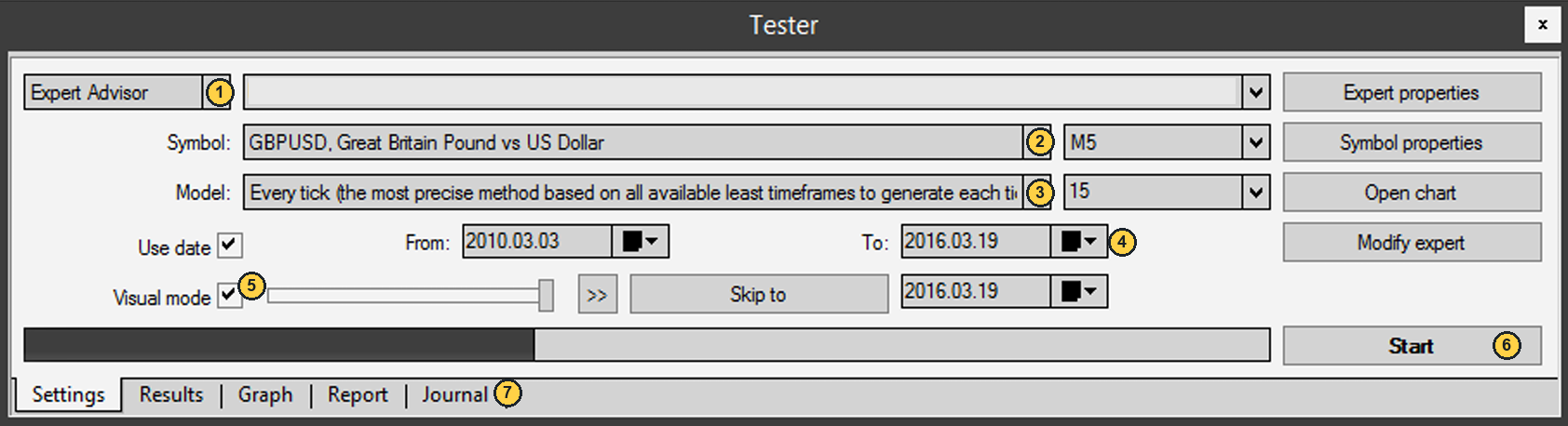
| No. | Label | Description |
|---|---|---|
| 1 | Expert Advisor |
Selects StereoTrader for the test. |
| 2 | Symbol |
Sets the instrument to test. |
| 3 | Model |
Select Every tick for the visual procedure described here. |
| 4 | To |
Sets the end of the selected test period. |
| 5 | Visual mode |
Shows the historical movement on the chart and allows manual operation. |
| 6 | Start |
Starts the test with the selected settings. |
| 7 | Journal |
Opens the tester messages. Other views include Graph and Report. |
History Trading with StereoTrader#
While the test is running, operate StereoTrader on the historical chart. Use the familiar chart controls for Market Orders, Pending Orders, SL, TP, and Trail. The individual procedures are explained in Open a Position, Close a Position, Manage Trades, and Pending Orders. The tester controls the historical timeline; it does not execute trades through a broker.
StereoTrader's additional TESTER panel lets you adjust the replay:
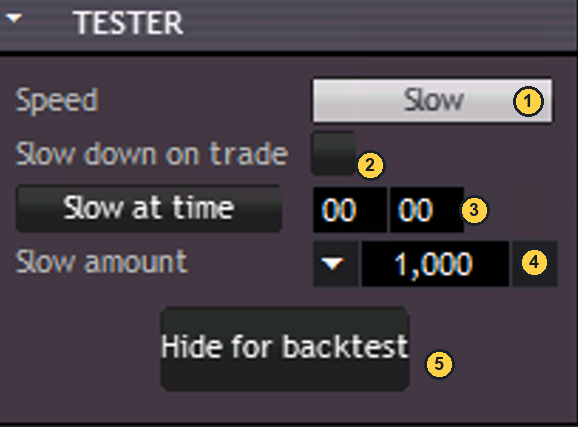
| No. | Label | Description |
|---|---|---|
| 1 | Speed |
Turns visual-test slow-down on or off. |
| 2 | Slow down on trade |
Slows the test while a position is open. |
| 3 | Slow at time |
Slows the replay at the specified tester time. |
| 4 | Slow amount |
Sets how much the replay slows; a higher value slows it further. |
| 5 | Hide for backtest |
Hides the visible StereoTrader output; manual operation on the chart is then unavailable. |
For manual History Trading, leave Visual mode on and Hide for backtest off. If you hide the StereoTrader display, the test continues without the visible interface, and you cannot enter manual trades on the chart.
View test results#
After the test, find the result views under Graph and Report in the MT4 tester. The graph shows the balance and equity over the test period, along with position size. The report summarizes modeling quality, results, drawdown, and trades. Each image shows one demo test run; its figures are examples and do not indicate future results.

| No. | Label | Description |
|---|---|---|
| 1 | Balance / Equity |
Shows these account values over the test period. |
| 2 | Size |
Shows the position size over the test period. |
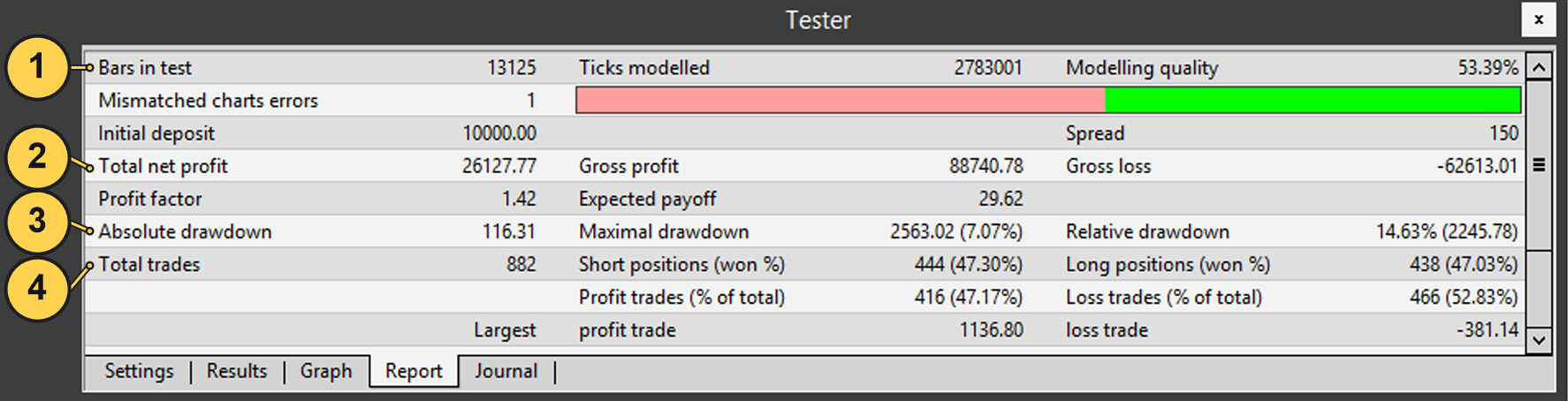
| No. | Label | Description |
|---|---|---|
| 1 | Bars in test |
Gives the number of price bars included in the test. |
| 2 | Total net profit |
Shows the overall result of this test run. |
| 3 | Absolute drawdown |
Shows a drawdown value for the test run. |
| 4 | Total trades |
Counts the trades; Short and Long positions are listed separately alongside it. |
Find CSV files#
StereoTrader saves tester and History data as .CSV files containing details of individual positions. In MetaTrader 4, open File → Open Data Folder, then go to Tester/Files. You can analyze the files in a spreadsheet, for example. No fixed file-naming scheme is specified here.
Requirements#
Allow DLL imports must be enabled to run StereoTrader in the MT4 tester. For this setting and other MetaTrader requirements, see Getting Started. The tester must keep running for the historical replay to continue. If you have problems, see History Trading or backtesting does not work.